
57 Absence Process and Recording Absences in InPlace
Students are to notify their preceptor as soon as they know they will be absent from their placement.
Absences must be recorded in InPlace within 24 hours or as soon as practical following the steps below:
- Go to Confirmed placement>Schedule.
- If you do not have a schedule, you must Add Day to Schedule.
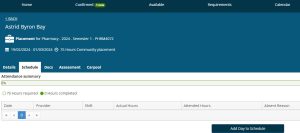
- If a schedule is present, select the Timesheet icon under Action.

- Students are to complete the timesheet with hours absent and absent reason and any hours made up.
- Students who are away for more than 2 days (i.e. on the THIRD day) due to illness must provide a medical certificate which they must upload to InPlace via Timesheets attachments.
- Students are to plan with preceptors to make up missed days/hours at a later date. Any variances occurring outside the placement dates in the Course Profile must be agreed with the WIL Partnership Coordinator in advance.
- If illness means the placement period is extended and an extension will be required for assessment items, students must contact their course coordinator and make a formal extension request via MyUQ.
- In cases where the student is unable to make up missed placement days a decision will be made on a case-by-case basis by the course coordinator as to whether the placement has been completed satisfactorily or not.